Learn how to use TxScript to create formula fields for document extraction
Overview
Formula Fields use the tx capability object to validate, transform, and enrich field values during document extraction. Formula fields run server-side in the context of a single document.
Formula fields are perfect for:
- Field validation and quality checks
- Data transformation and normalization
- External API lookups and enrichment
- Dataset lookups and translations
- Complex calculations based on document data
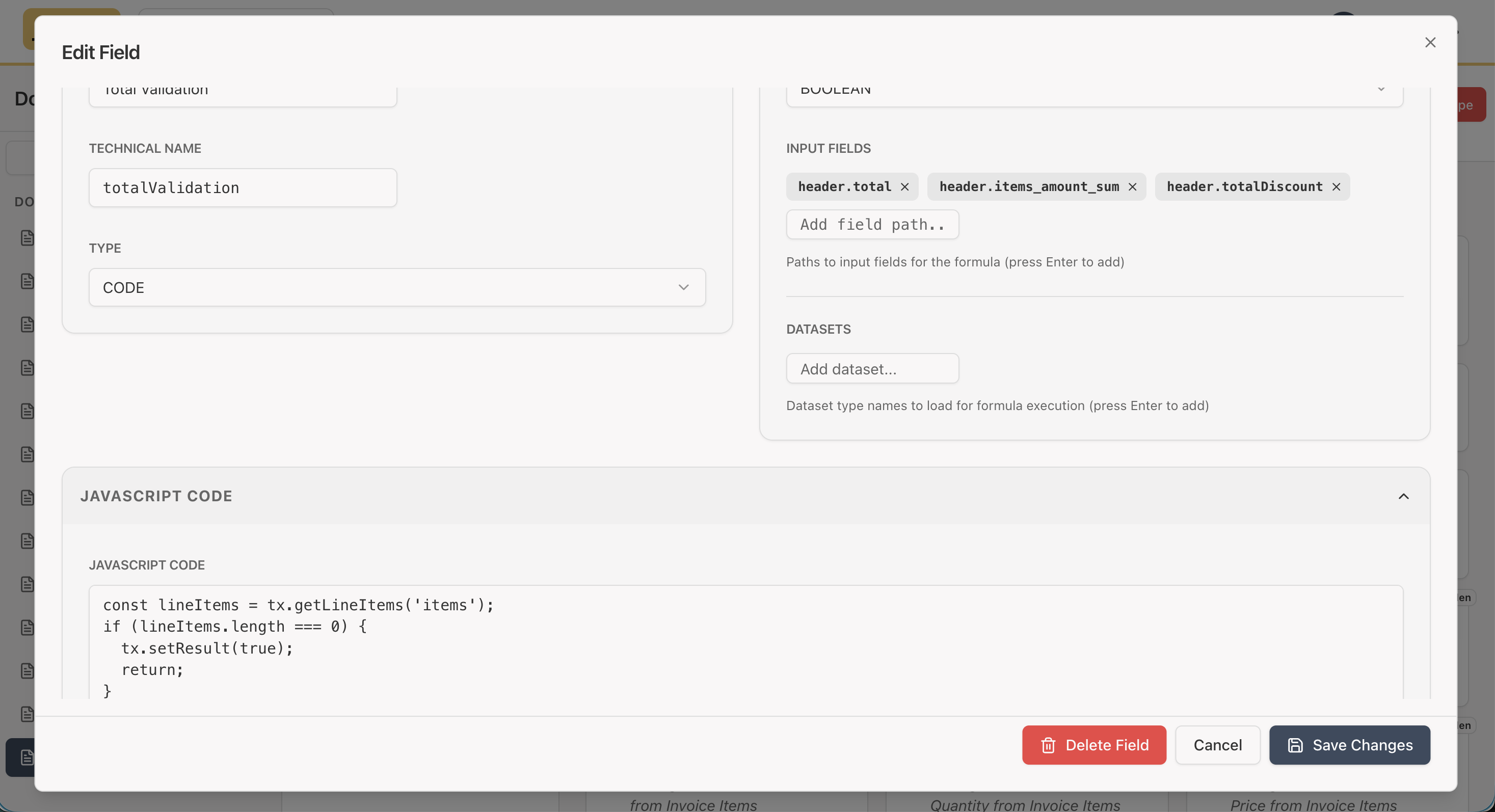
You can add or edit formula fields in the Apps → Document Types → Header Fields or Line Item Fields section.
- Click on Add Field, or Double-click on an existing field to edit it.
- Select Code as the field type.
- Write your JavaScript code in the Code field.
- Click on Save to save your changes.
Setting the Hidden flag will hide the field from the UI
External System Integration
Formula fields provide a powerful way to integrate with external systems such as your ERP, CRM, accounting software, or any database. This enables real-time data synchronization and validation during document extraction.
How It Works
You can interact with external systems using HTTP requests through the tx.http.request() method. This allows you to:
- Retrieve data from external systems to enrich document fields
- Send data to external systems for validation or synchronization
- Query databases via REST APIs or web services
- Validate information against external sources in real-time
Example Use Cases
- ERP Integration: Look up product information, pricing, or inventory levels from your ERP system
- CRM Integration: Validate customer information or retrieve account details
- Accounting Systems: Check invoice status, validate account codes, or sync transactions
- Database Queries: Query your internal databases for reference data or historical records
Making HTTP Requests
All HTTP requests go through the tx.http.request() method, which provides:
- Security: All requests are validated and rate-limited
- Error handling: Built-in timeout and error management
- Flexibility: Support for GET, POST, PUT, DELETE, and PATCH methods
Here's a simple example of fetching data from an external API:
// Fetch product information from ERP system
const sku = tx.getCurrentLineItem()?.sku;

if (sku) {
  const response = await tx.http.request({
    url: "https://your-erp-system.com/api/products",
    method: "GET",
    headers: {
      "Authorization": "Bearer YOUR_API_TOKEN"
    },
    body: { sku: sku }
  });

  if (response.ok && response.body) {
    tx.setCurrentLineField("description", response.body.name);
    tx.setCurrentLineField("price", response.body.price);
  }
}
See the HTTP Requests section below for detailed API documentation.
Quick Start
Formula fields receive a tx capability object as their only parameter. The code runs in the context of either a header field or a line item field:
// Example: Lookup product description from SKU
const lineItem = tx.getCurrentLineItem();
const sku = lineItem?.sku;

if (!tx.utils.isNonEmptyString(sku)) {
  tx.addMessage("SKU is required", { level: "error", field: "sku" });
  return;
}

// Lookup in dataset
const product = tx.dataset.lookup("sku2en", "SKU", sku);

if (!product) {
  tx.addMessage(`SKU "${sku}" not found in catalog`, {
    level: "warning",
    field: "sku"
  });
  return;
}

// Set description from dataset
tx.setCurrentLineField("description", product["English Item Name"]);

// Set the result
tx.setResult(product["English Item Name"]);
Core API
Reading Data
Header Fields
// Get a single header field
const vendorName = tx.getField("vendorName");

// Get multiple header fields at once
const { date, currency, totalAmount } = tx.getFields(["date", "currency", "totalAmount"]);
Line Items
// Get the current line item (when running in a line-item context)
const currentItem = tx.getCurrentLineItem();
const sku = currentItem?.sku;

// Get a specific line item
const item = tx.getLineItem("items", 0);

// Get all line items from a collection
const allItems = tx.getLineItems("items");

// Get current collection context
const collectionKey = tx.getCurrentCollection(); // e.g., "items"
const index = tx.getCurrentIndex(); // e.g., 0
Full Context
// Get the complete document context
const context = tx.getContext();
// Returns: { header: {...}, lineItems: {...}, file: {...} }
Writing Data
Setting Results
// Set the computed result for a formula field
tx.setResult(computedValue);
Setting Header Fields
// Set a single header field
tx.setField("vendorName", "Acme Corp");

// Set multiple header fields
tx.setFields({
  vendorName: "Acme Corp",
  date: "2025-01-15",
  currency: "USD"
});
Setting Line Item Fields
// Set a field on a specific line item
tx.setLineField("items", 0, "description", "Product Name");

// Set a field on the current line item (when in line-item context)
tx.setCurrentLineField("description", "Product Name");
Dataset Access
NOTE - Datasets are currently deprecated - the code still exist but not in use in any real path
Datasets are pre-loaded lookup tables that you can query:
// Get all rows from a dataset
const allRows = tx.dataset.getAll("sku2en");

// Find first matching row
const match = tx.dataset.find("sku2en", (row) => row.SKU === sku);

// Find all matching rows
const matches = tx.dataset.filter("sku2en", (row) => row.Category === "Electronics");

// Lookup by field value (case-insensitive field names)
const product = tx.dataset.lookup("sku2en", "SKU", sku);
HTTP Requests
Make HTTP requests to external APIs (customer-owned endpoints):
// Simple GET request
const response = await tx.http.request({
  url: "https://api.example.com/products",
  method: "GET"
});

// POST request with body
const response = await tx.http.request({
  url: "https://api.example.com/validate",
  method: "POST",
  headers: {
    "Content-Type": "application/json"
  },
  body: { sku: "12345" },
  timeoutMs: 10000 // Optional timeout override
});

// Response structure
if (response.ok) {
  const data = response.body; // Parsed JSON if applicable
  const text = response.bodyText; // Raw text
  const status = response.status; // HTTP status code
}
Notifications and Messages
Add user-facing notifications:
// Info message
tx.addMessage("Processing completed successfully", { level: "info" });

// Warning message
tx.addMessage("SKU not found in catalog", {
  level: "warning",
  field: "sku" // Optional: field name for line-item context
});

// Error message
tx.addMessage("Failed to validate product", { level: "error" });
Utilities
// Check if value is a non-empty string
if (tx.utils.isNonEmptyString(value)) {
  // value is guaranteed to be a string
}

// Parse number from string or number
const num = tx.utils.parseNumber("123.45"); // Returns 123.45 or null

// Check if value is nullish
if (tx.utils.isNullish(value)) {
  // value is null or undefined
}

// Format currency
const formatted = tx.utils.formatCurrency(1234.56, "USD"); // "$1,234.56"
Logging
Log messages for debugging:
tx.log("debug", "Processing SKU", { sku: "12345" });
tx.log("info", "Validation complete");
tx.log("warn", "Rate limit approaching");
tx.log("error", "API request failed", { status: 500 });
Complete Examples
Example 1: SKU to Description Lookup
// Get current line item
const lineItem = tx.getCurrentLineItem();
const sku = lineItem?.sku;

if (!tx.utils.isNonEmptyString(sku)) {
  tx.addMessage("SKU is required", { level: "error", field: "sku" });
  return;
}

// Lookup in dataset
const product = tx.dataset.lookup("sku2en", "SKU", sku);

if (!product) {
  tx.addMessage(`SKU "${sku}" not found in catalog`, {
    level: "warning",
    field: "sku"
  });
  return;
}

// Set description from dataset
tx.setCurrentLineField("description", product["English Item Name"]);

// Set the result
tx.setResult(product["English Item Name"]);
Example 2: External API Validation
// Get current line item
const lineItem = tx.getCurrentLineItem();
const sku = lineItem?.sku;

if (!tx.utils.isNonEmptyString(sku)) {
  return;
}

// Validate via external API
try {
  const response = await tx.http.request({
    url: "https://api.example.com/validate",
    method: "POST",
    body: { sku: sku }
  });

  if (response.ok && response.body.valid) {
    tx.setCurrentLineField("validated", true);
    tx.setCurrentLineField("validationDate", new Date().toISOString().split('T')[0]);
  } else {
    tx.addMessage("Product validation failed", {
      level: "warning",
      field: "sku"
    });
  }
} catch (error) {
  tx.log("warn", "Validation API unavailable", { error: error.message });
  tx.addMessage("Could not validate product", {
    level: "info",
    field: "sku"
  });
}

tx.setResult(lineItem.description || sku);
Example 3: Calculate Total with Tax
// Get header fields
const subtotal = tx.getField("subtotal");
const taxRate = tx.getField("taxRate");

// Parse numbers
const subtotalNum = tx.utils.parseNumber(subtotal) || 0;
const taxRateNum = tx.utils.parseNumber(taxRate) || 0;

// Calculate total
const taxAmount = subtotalNum * (taxRateNum / 100);
const total = subtotalNum + taxAmount;

// Set calculated fields
tx.setField("taxAmount", taxAmount);
tx.setField("total", total);

// Set result
tx.setResult(total);
Example 4: Multi-Field Validation
// Get header fields
const vendorName = tx.getField("vendorName");
const invoiceNumber = tx.getField("invoiceNumber");
const date = tx.getField("date");

// Validate required fields
const errors = [];

if (!tx.utils.isNonEmptyString(vendorName)) {
  errors.push("Vendor name is required");
}

if (!tx.utils.isNonEmptyString(invoiceNumber)) {
  errors.push("Invoice number is required");
}

if (!tx.utils.isNonEmptyString(date)) {
  errors.push("Date is required");
}

// Validate date format (YYYY-MM-DD)
if (tx.utils.isNonEmptyString(date)) {
  const dateRegex = /^\d{4}-\d{2}-\d{2}$/;
  if (!dateRegex.test(date)) {
    errors.push("Date must be in YYYY-MM-DD format");
  }
}

// Add error messages
if (errors.length > 0) {
  errors.forEach(error => {
    tx.addMessage(error, { level: "error" });
  });
  return;
}

// All validations passed
tx.setResult("Valid");
Execution Context
Formula fields run in one of two contexts:
Header Field Context
- Runs once per document
- Access header fields via
tx.getField() - Set header fields via
tx.setField() - No line item context available
Line Item Field Context
- Runs once per line item in a collection
- Access current line item via
tx.getCurrentLineItem() - Access other line items via
tx.getLineItem()ortx.getLineItems() - Set current line item fields via
tx.setCurrentLineField() - Can also access header fields via
tx.getField()
Security & Limits
- HTTP calls: Maximum 10 calls per formula execution (configurable)
- Default timeout: 5 seconds per HTTP request (configurable)
- Execution timeout: 30 seconds total execution time
- Data access: All data access is read-only (cloned values)
- Validation: All inputs are validated and sanitized
Best Practices
- Validate inputs: Always check for required fields and valid formats
- Handle errors gracefully: Use try-catch for external API calls
- Use datasets: For lookups, prefer datasets over HTTP calls when possible
- Add meaningful messages: Provide clear error and warning messages
- Set results: Always call
tx.setResult()with the computed value
Formula fields run during document extraction. They have access to the document's header and line items, but cannot access organization-wide data like mini-apps and tasks can.