I had no idea where my money went, so I built a free, local Google Drive for my financial documents
DocAI is a free, open-source app that organizes your invoices, receipts and bank statements on your own computer. AI extracts the data, and Claude can build mini apps on top of it that run without AI.
I built DocAI because I couldn't accept having no idea what was going on with my money.
The data is all there: invoices, receipts, bank transactions. But each one comes in a different format, from a different source, at a different time of the month. Organizing it all in Excel is a full-time job, so most of us give up and hope we can trust the institutions that handle our money.
Then one day you do need to understand your data, and you end up digging through emails, accounts and interfaces that were never built for it. You can waste days answering a simple question:
- How did I miss a tax payment?
- Did I get paid for this job?
- What is this expense I don't remember making?
In the age of AI, this should be simple. You need one place where you can drop all your documents, let AI do the first pass at extracting the data, and then browse, search and reconcile it.
That's what DocAI is.
Google Drive, but for your finances
The easiest way to think about DocAI: a free, local, open-source Google Drive, optimized for financial documents.
- Free and open source. MIT license. The code is on GitHub.
- Local. It runs on your own computer, and it is only reachable from your own machine.
- Private. Your files stay where they are. You decide which AI, if any outside your computer, gets to read them.
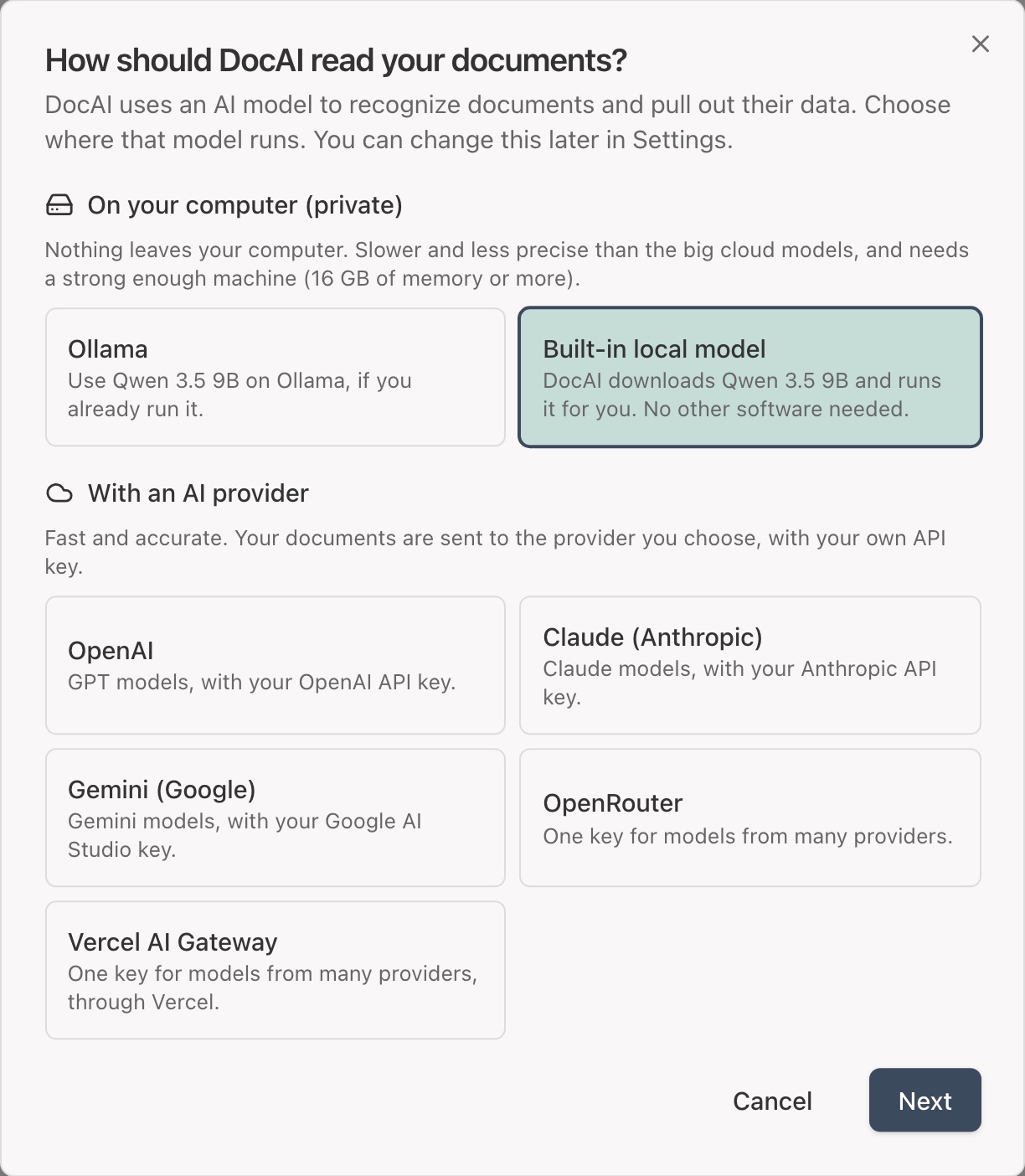
The difference from a regular drive is that DocAI understands what is inside your files. It knows an invoice from a receipt, reads the vendor, the date, the totals and the line items, and connects payments to the invoices they paid.
How it works
- Connect a folder. Any folder works, including a Google Drive folder synced to your computer. DocAI's folders are your real folders on disk: add, move or rename a file and DocAI follows; move a document in DocAI and the file moves too.
- The data is extracted automatically. Every document is recognized (invoice, receipt, bank statement...) and its data is pulled into a structured schema. DocAI ships with schemas for common documents, and you can create your own.
- Work with your data. Browse and search in a Drive-like interface, and match payments to invoices with the built-in reconciliation tool.
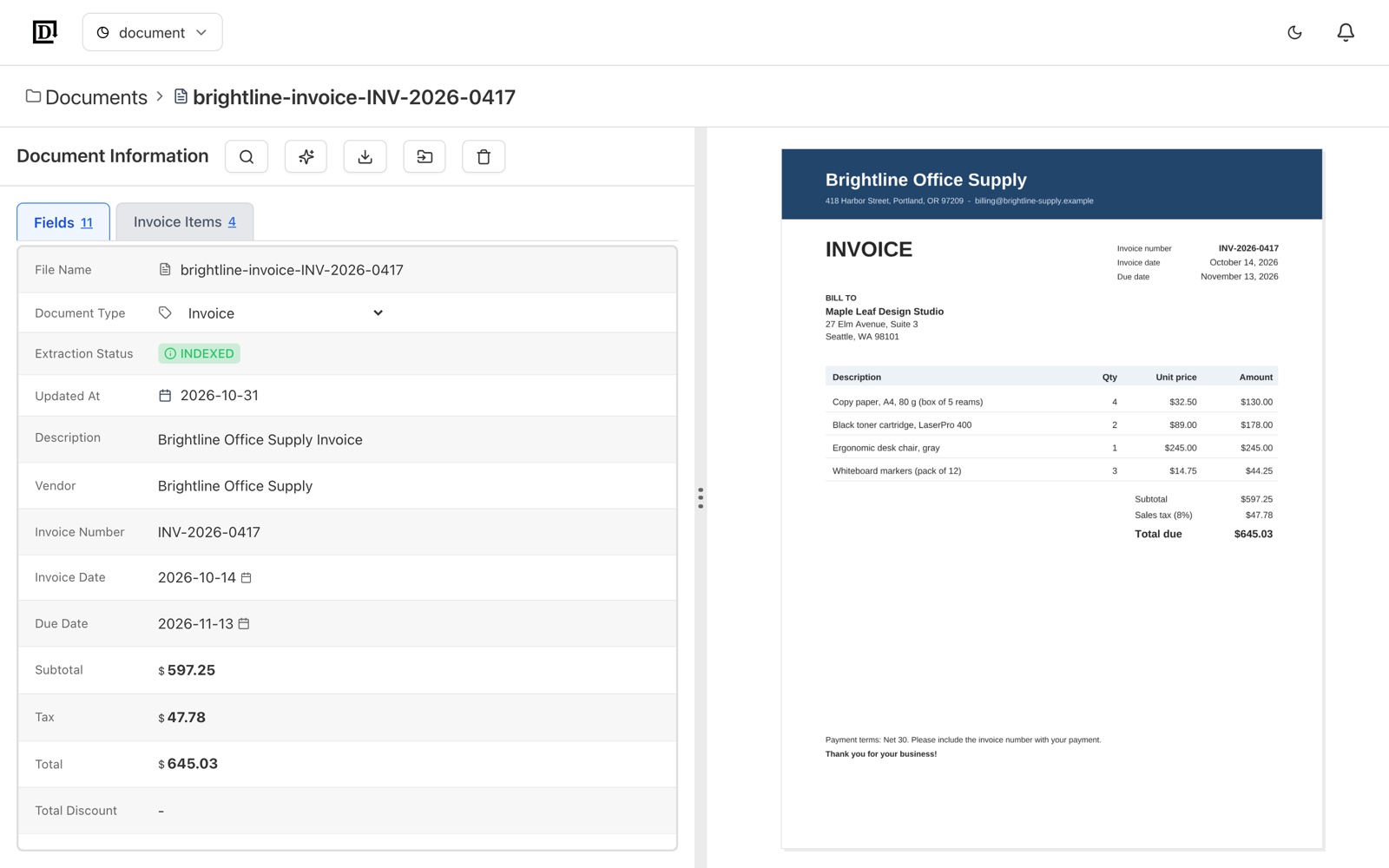
You choose which AI reads your documents
When you first open DocAI, a short setup asks where the AI should run:
- On your own computer. DocAI downloads and runs Qwen 3.5 9B for you, or uses Ollama if you already have it. Your documents never leave your computer. It's slower than the big cloud models and needs a strong enough machine (16 GB of memory or more).
- With a provider you already trust. Use your own API key for OpenAI, Claude, Gemini, OpenRouter or Vercel AI Gateway. It's fast and accurate, and your documents go only to the provider you choose.
You can switch at any time in Settings.
Connect Claude, then just ask
DocAI is also an MCP server, so you can connect Claude (or any AI assistant that supports MCP) and work with your documents in plain language:
- "Which invoices from last quarter are still unpaid?"
- "Move all 2024 invoices from Acme into a folder called Acme."
- "How much did I spend on software in March?"
- "Build me a mini app that shows monthly spending by vendor."
For Claude Code there is a plugin that connects it to DocAI and teaches it how to use it.
Mini apps: AI builds them once, then they run on their own
This is the part I find most useful.
A mini app is a small tool built on top of your data: a monthly expense report, a VAT summary, a vendor dashboard. You describe it to Claude, and Claude builds it once. After that, the mini app is code. It runs without calling an AI model, which makes it:
- Faster: no waiting for a model to answer.
- Deterministic: the same input always gives the same result.
- Cheaper: no tokens spent each time you run it.
- Private: no data is sent anywhere.
That last point opens a nice pattern: let Claude build the mini app on a few sample documents, then run it on your real documents completely offline.
Here are three mini apps I use every day.
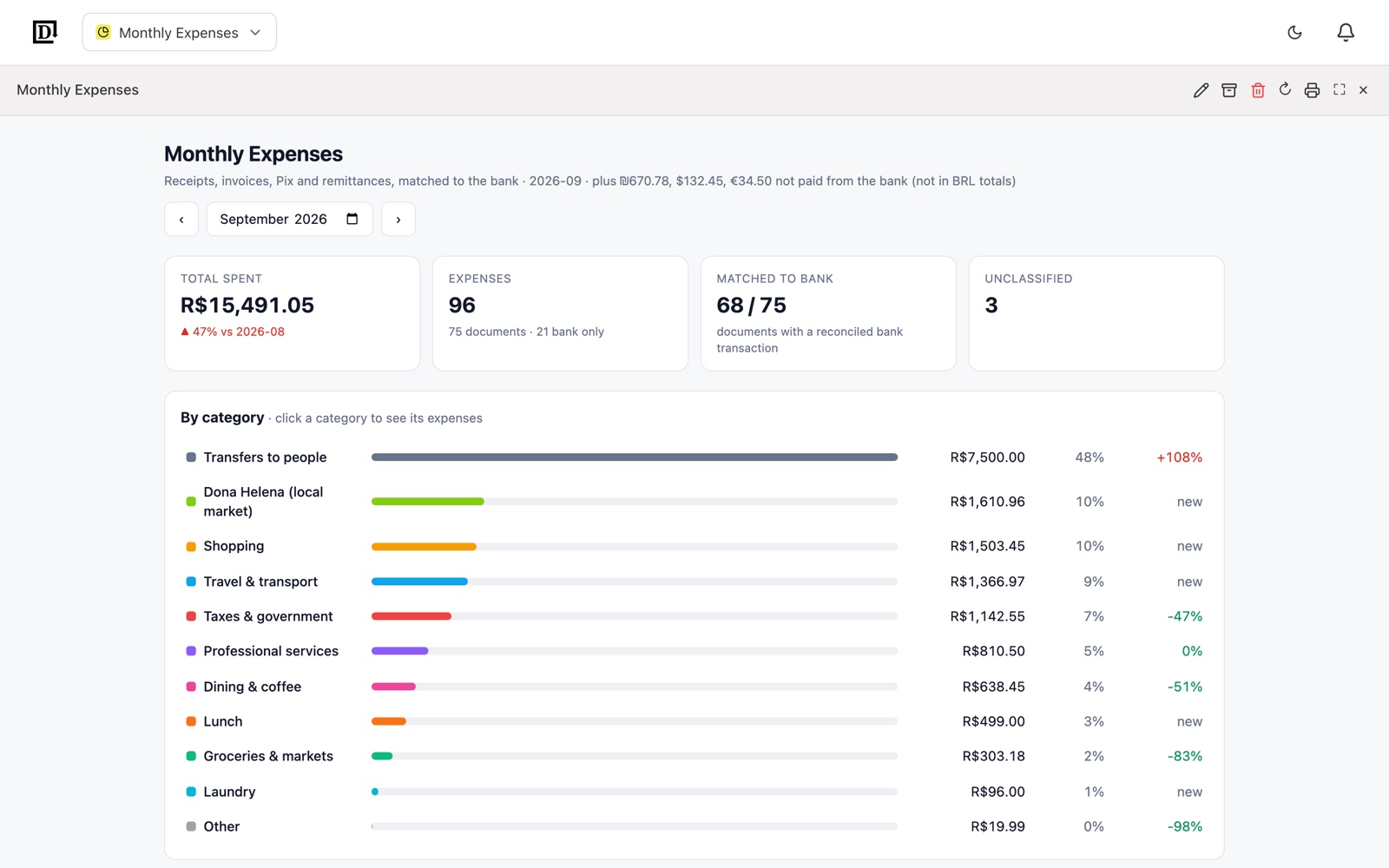
Monthly Expenses shows where the money went each month, by category and by vendor.
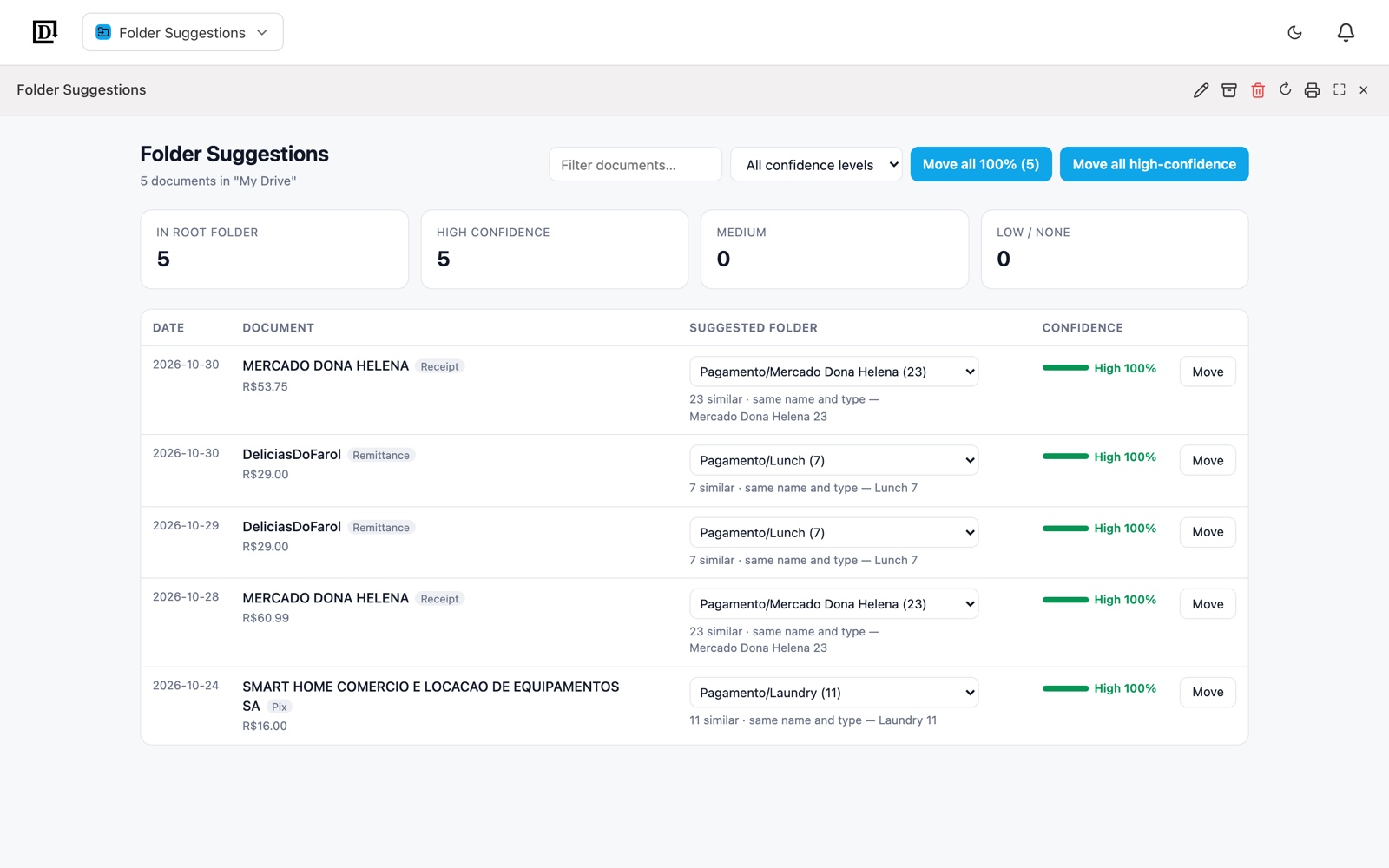
Folder Suggestions looks at documents sitting in the wrong place and suggests the folder each one belongs in. One click moves it, on disk too.
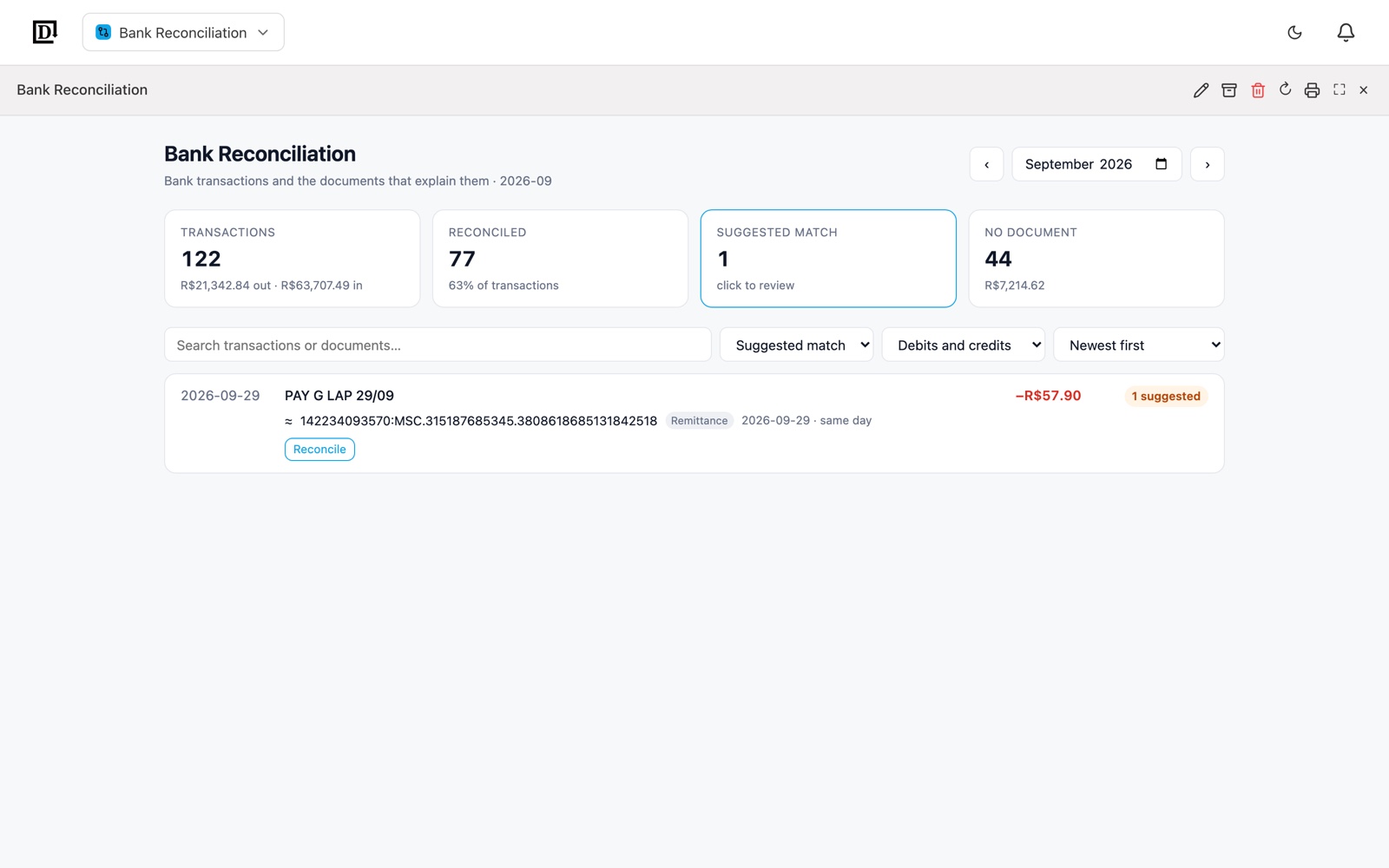
Bank Reconciliation matches bank transactions to invoices and receipts and suggests the matches. You review them and accept the ones that are right.
How I use it
My DocAI folder is a Google Drive folder synced to my computer. Whenever I buy something and get a receipt, I take a photo or a screenshot and save it to Google Drive; every other document goes there too. Once it syncs, DocAI picks it up and extracts the data.
Then I connect Claude Code to DocAI and use it to organize my documents into folders, create reports, match invoices with bank transactions, and link my income to my tax payments, so I never miss one and can predict the next.
Since I started using it, I no longer spend days at the end of every month figuring out where my money went. I never lose track of a payment, and tax time no longer brings surprises.
Get started
You need Node.js. Then:
git clone https://github.com/eliaweiss/doc-ai.git
cd doc-ai
npm install
npm start
Open http://localhost:4310, and the setup walks you through choosing your folder and your AI. The setup guide has every step with screenshots, and the mini app examples show the three apps above in detail.
I built DocAI for myself, but I believe it can help anyone who wants to understand their money without handing it all to someone else.
- Learn more: doc-vision.com/docai
- Get the code: github.com/eliaweiss/doc-ai